

.svg)




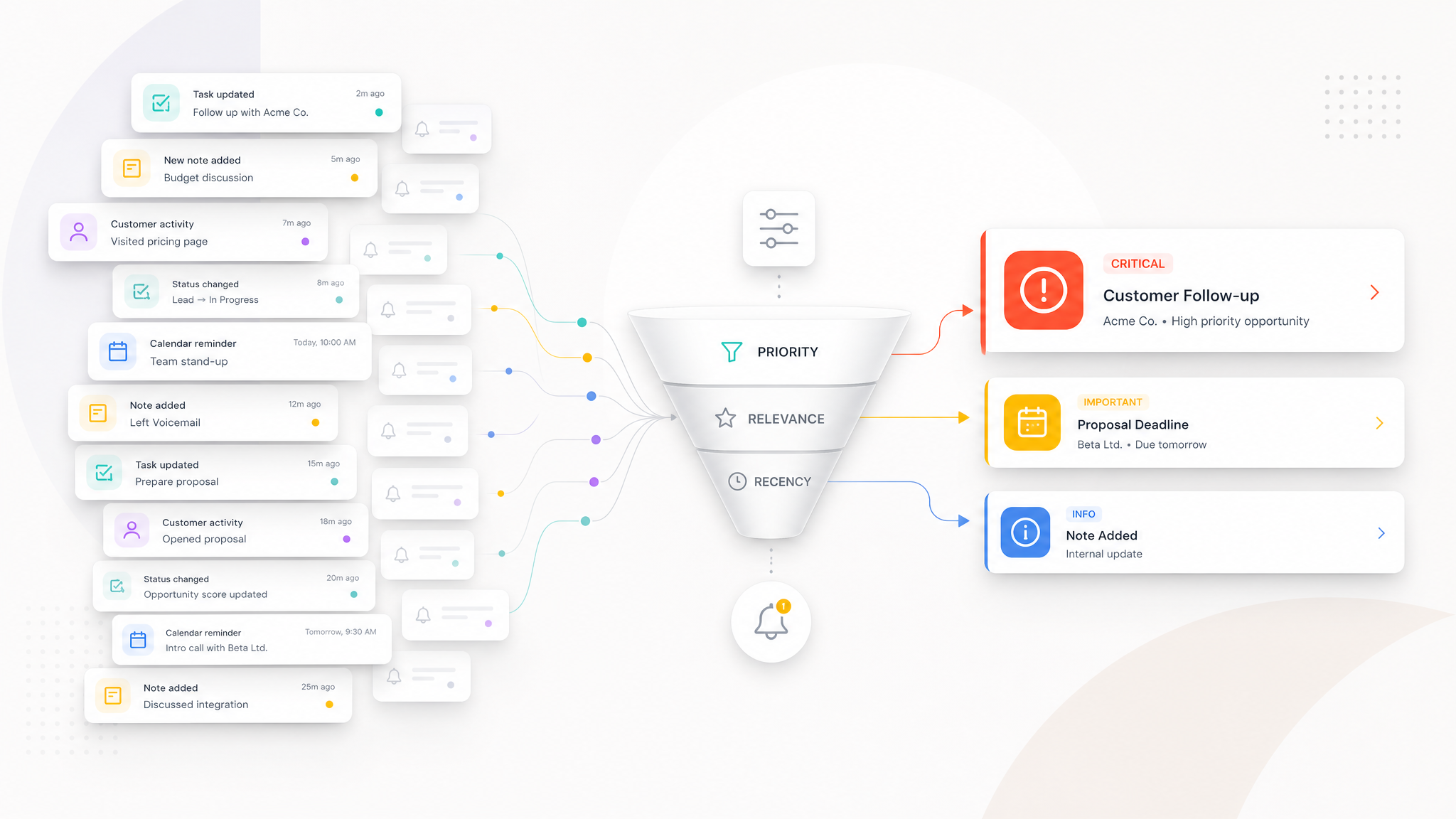
Notification governance in CRM enables sales teams to work without unnecessary alert clutter while ensuring that critical actions are not missed.
Why does notification overload weaken follow-up discipline?
CRM systems play an important role in reminding sales teams of the right action at the right time. However, when every activity generates a notification, the value of notifications declines over time. When users receive constant alerts, they struggle to distinguish what is critical from what is routine. Eventually, notifications become background noise instead of creating follow-up discipline.
Alert fatigue in sales teams usually stems from rules that began with good intentions. When a notification is created for every overdue task, new record, note, change, and approaching date, users’ attention becomes fragmented. The purpose of CRM is not to interrupt users continuously, but to make the points that genuinely require intervention visible.
Which notifications are truly critical in CRM?
The first step in effective notification governance is to classify notifications by importance. Not every CRM activity has the same urgency. A critical customer follow-up date, a pending action in a high-value opportunity, a customer request that has remained unanswered for a long time, or a special situation awaiting manager approval can be treated as a priority notification.
By contrast, activities intended only to inform can be shown through different channels or in daily summaries. For example, instead of sending an instant notification whenever a note is added, it may be more appropriate to keep the note visible within the record when the relevant user needs it. Notifications then reach users only when an action is genuinely expected.
Notifications tied to customer actions
The most valuable sales notifications are often tied to customer-related actions. Alerts such as a planned follow-up date after a quotation, a response expected from the customer, preparation for an upcoming meeting, a task to complete after an important discussion, or a critical customer who has not been contacted for a defined period help preserve the sales rhythm.
The purpose of these notifications is not to penalize the user, but to keep the customer experience uninterrupted. When the right structure is in place, representatives can identify more quickly which actions matter most during the day.
Notifications requiring manager attention
Some notifications are meaningful not for the sales representative, but for the manager. Stalled opportunities above a certain value, declining activity among key customers, a lack of action despite an approaching critical date, or a recurring bottleneck across the team should be visible at management level.
Notifications sent to managers must also be designed carefully. If every minor delay appears on the manager’s screen, real risks can disappear among them. Manager notifications should therefore be configured with higher thresholds and clearer business rules.
How should alert rules be prioritized?
Three basic questions can be asked when prioritizing notifications: Does this notification require an action? If the action is delayed, will the customer or sales outcome be affected? Is this information reaching the right person? If these three questions cannot be answered clearly, the notification rule should be reassessed.
Alerts in CRM can be divided into levels such as critical, important, and informational. Critical alerts can be sent as instant notifications, while informational alerts can be limited to a daily summary or visibility within the record. This allows user attention to be managed more accurately.
How should notification frequency and user role be balanced?
Sales representatives, sales managers, operations teams, and senior management do not need the same notifications. Representatives focus on daily actions, while managers want to see exceptions, risks, and signs of delay. For senior management, periodic summaries and critical deviations are more meaningful than instant notifications.
Notification design should therefore be role-based. The same event can use a different notification channel or have a different priority for different users. When the right balance is established, CRM becomes a guidance tool that clarifies business priorities rather than an alarm system that exhausts users.
Creating a more meaningful notification structure with Konguru CRM
Managing customer, quotation, task, visit, and sales records together in Konguru CRM makes it possible to interpret notifications according to their business context. Critical customer actions, opportunities that require follow-up, and situations needing manager attention can be made more visible through the right rules.
What matters to sales teams is not receiving more notifications, but receiving the right notification at the right time. Notification governance is therefore a strategic design topic that directly affects the efficiency of CRM use.
Request a Konguru CRM demo to separate critical actions from unnecessary notification clutter in your sales team.